


At the bottom: how to find out whether your child’s school plans to turn on Google Search next year, and what to ask about the AI that comes with it.
Starting early next year, Google Search will be off on Vermont students’ school accounts unless their district turns it on. Google says a district that turns it on will have two versions to choose from, and both come with artificial intelligence built in.
Vermont’s Agency of Education already advises schools to keep chatbots away from young students. It says it is waiting to see how Google responds to pushback before giving districts formal guidance on the change. “Given the pace of developments, we are waiting to see how Google responds and to better understand the practical implications for schools before providing formal guidance to districts,” Lindsey Hedges, a policy communications specialist for the agency, said in an email to Compass.
What Google changed
Google Search already includes AI features. What changes is that Search itself becomes something a district has to switch on. Google announced the change Nov. 3. For K-12 student accounts that schools manage:
Four Google services will be off by default starting in early 2027:
Google Search
the Gemini chatbot
Gemini Notebook, an AI study tool
Gemini in Classroom, the AI tools inside Google’s assignment app
Each stays off until a district turns it on.
A district can turn on Search without turning on the Gemini chatbot.
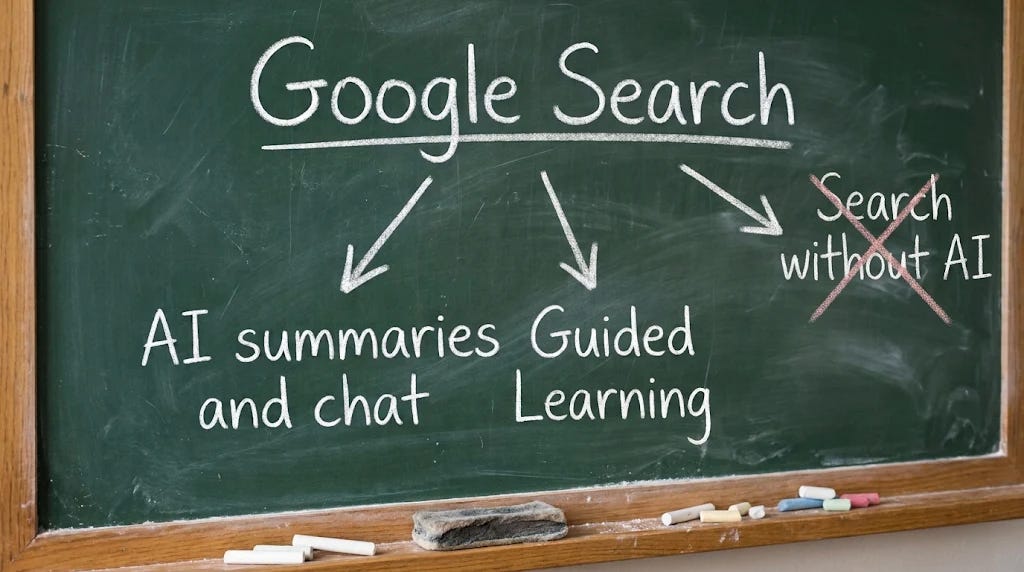
A district can’t turn on Search without its AI features. Those include AI Overviews, the AI-written summaries at the top of search results, and AI Mode, a chatbot-style feature that answers questions and follow-ups.
A district that leaves Search off loses it. Students will see a message that it isn’t available, Chris Phillips, Google’s vice president for education, told the New York Times.
“Search and AI are deeply integrated,” Phillips told the Times.
The two versions, according to the Times:
The standard version works like the one adults use, with AI summaries and AI chat.
The Guided Learning version runs through a student version of Gemini. Google says it walks students through a problem step by step instead of handing them the answer.
Why it matters in Vermont
In its January guidance, the agency said all Vermont schools were using Google for Education, Google’s software for schools. So the change could reach every public school system in the state.
That guidance is advice, not a rule, and it draws a line by grade:
Pre-K through grade 2: no AI chatbots.
Grades 3 to 5: no open-ended chatbots. AI is OK only when it’s built into a program for a specific subject and its answers stick to the lesson.
Grades 6 to 8: chatbots designed for schools, under a teacher’s direction, but not general-purpose ones.
A Vermont district that keeps Google Search for elementary students will have two choices under Google’s plan. One gives students AI summaries and lets them ask follow-up questions. The other uses Guided Learning, which Google says will coach students through problems. Compass asked the Agency of Education whether either option fits its recommendations for elementary grades. The agency has yet to say.
The state also doesn’t know where districts stand now. Asked last month which school systems let students use Gemini, the agency told Compass it doesn’t collect that information.
Google’s case and its critics
Google says the change answers schools that asked for more control. Its statement said the announcements “give schools more choice, not less,” CNN reported. Google says AI Mode and AI Overviews in the school version of Search will guide students through problems step by step, so they don’t get quick answers to schoolwork. A Google product lead told the Times that teachers using the school version of Guided Learning will be able to read students’ chatbot conversations.
Critics say the guided version doesn’t settle the question. When a Times reporter tested the version of Guided Learning available to the public, it wrote a detailed essay for an Advanced Placement history assignment. In July, Common Sense Media, a nonprofit that reviews technology for families, rated AI Overviews and AI Mode an “unacceptable risk” for young users.
Vermont Sen. Bernie Sanders called the change extortion in a post the day Google announced it. On Nov. 9, Sen. Ed Markey of Massachusetts wrote to Google’s CEO asking the company to reverse the change. He asked Google to answer by Nov. 30, including whether it is technically possible to give schools Search without generative AI, the kind that writes text and answers questions.
Hedges said Google is facing “considerable pressure from educators and school systems to provide districts with more granular control over which AI features are enabled for students.” The agency will keep watching and share recommendations as more information comes out, she said.
Google hasn’t given an exact date for the change. It says schools will get details in the coming months.
What you can check
Google’s change puts the decision with your school district. Here’s how to find out what your district is planning, so you can make up your own mind.
Ask your school or district:
Will the district turn on Google Search for students when the change takes effect, and for which grades?
If so, which version: the one with AI summaries and AI chat, or the Guided Learning version?
If the district leaves Google Search off, what will students use for research instead?
Will the Gemini chatbot be on for students, and starting in what grade?
Has the district tested whether its web filter, the software that blocks websites on school devices, can show plain search results under Google’s new setup? At least one company that sells web filters to schools says its product can skip the AI summaries. It announced that the day before Google’s change.
Find out who decides. Ask your superintendent or district technology director who will make the call, and how parents can weigh in.
Find your district’s AI policy. Look on your district’s website or in the school board’s policy manual for “artificial intelligence” or “AI.” If you can’t find one, there may not be one yet.
Read the state’s recommendations. The Vermont AI Guidance for Education sets out the grade-by-grade line on pages 8 and 9. The state’s education technology contact is Josh Blumberg, josh.blumberg@vermont.gov.
Compass Vermont is built on giving you the information and the next step so you can decide for yourself. If you find that useful, a paid subscription is the best way to support it, and it’s greatly appreciated.